Customizable Styles
Similar to customizable backgrounds, if you also hold the Alt-key (Option-key on Macintosh keyboards) down when you shift-click on a background, you get a picker that allows you to upload CSS or SASS that can change the appearance of a table.
Before you do so, you should upload a custom button or background and then use web developer tools to delete it, just to be sure you can do so, because an unwanted style-sheet is going to be much more annoying than an unwanted button or background.
To delete the database, you need to have a craftpoker.com window as your front-most browser window (it can be the lobby or a table window) then choose “View -> Developer -> Developer Tools” to get the developer window up. Then you need to choose the Application tab, and then select “IndexedDB -> mb2” in the pane on the left. That will bring up a page that has a “Delete Database” button:
You can then choose “Delete database” and an empty database will be rebuilt as soon as you refresh any craftpoker.om window. Once you’re comfortable deleting the database, you can bring up a table by using the demo button on craftpoker.com (you’ll only see the demo button if you’re not logged in, but you can be logged in to the lobby on one tab and not logged in on another tab and get the demo button on that other tab). You have to click the “demo” button, then create a demo tournament, then click “Start” after that tournament has been created. You should then get two table windows and you can play.
This is proof-of-concept, only. The format of a stylesheet is not documented, nor is it stable. However, this is the style sheet used: table.scss. At the end of that file there are two css rules currently commented out by a multi-line comment:
/*
button.fold {
    text-indent: -9999px;
    line-height: 0;
}

button.fold::after {
    content: "Foldem";
    text-indent: 0;
    display: block;
    line-height: initial;
}
*/
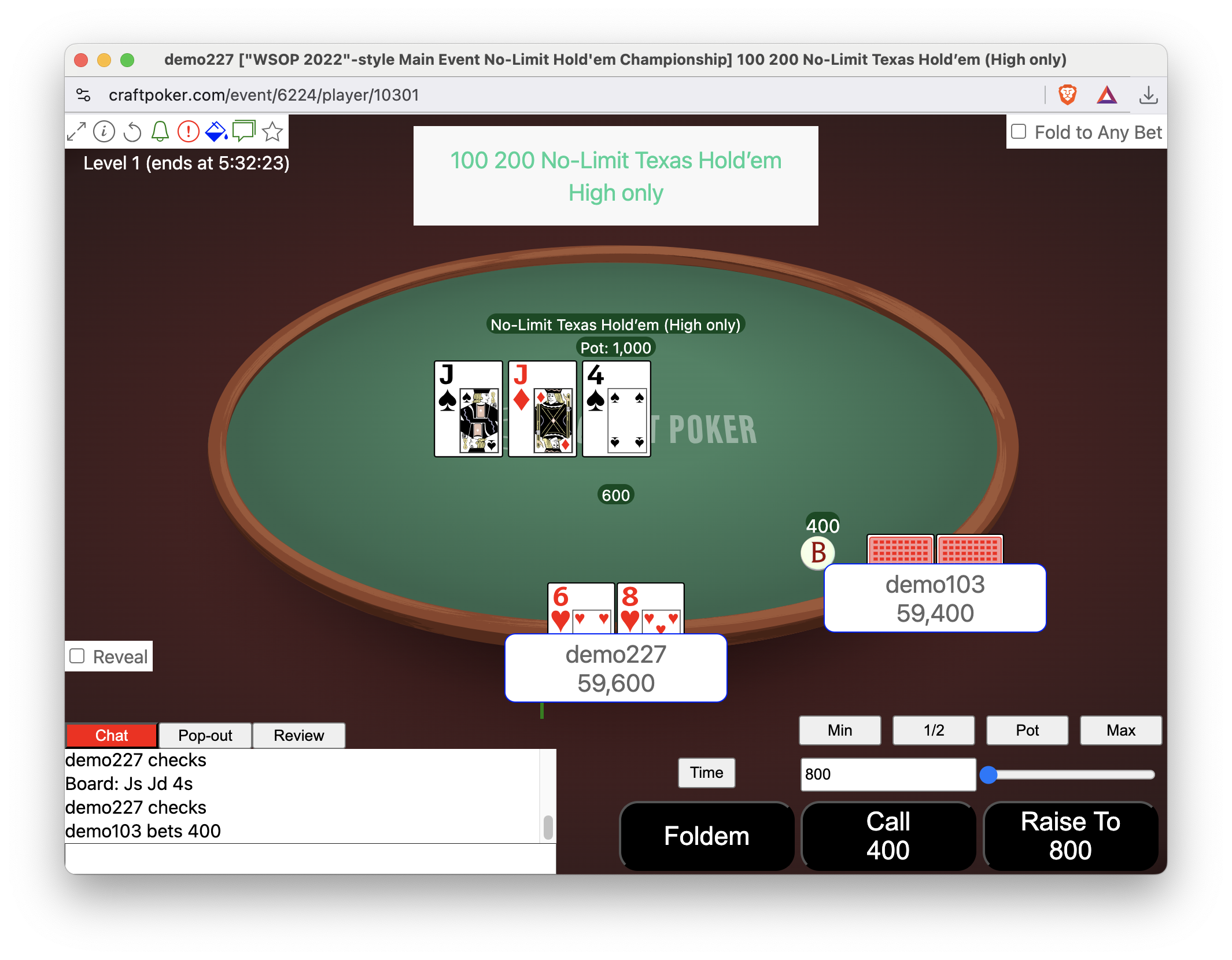
If you delete the /* line and the */ line and then use Alt-shift-click to
install the resultant file, the “Fold” button will say “Foldem”. If you change
.pushable.std {
    background: #FB0F0C;
}
to
.pushable.std {
    background: black;
}
you’ll get black buttons, etc.
E.g., after doing both:
Asset Packs
In addition to what’s mentioned above, it’s possible to upload a Zip
file that contains a “tables.scss” file, and images and fonts that
tables.scss can use as url() targets. This is nascent and
undocumented, but it’s there. Tiny bits of informatiom are available
in the GitHub issue that
tracks the addition of this functionality and in the
css-asset-pack Rust crate
that provides the core of this functionality.
TLDR
Eventually, mb2 will be trivially customizable by anyone. Right now, nobody is using this functionality, because doing so is just too painful even if you are already comfortable with CSS and SASS. However, the underlying mechanism to support customization is present and sound.